

PDF to Tiff in Adobe Acrobat Standard or Pro
Converting a PDF to TIFF in Adobe Acrobat and reducing size (when normal convert still isn’t enough)
(Optional) Isolate the files you want to convert
Document | Extract Pages
Saving the file and reducing resolution
File | Save As
save as type, change to Tiff, then click Settings button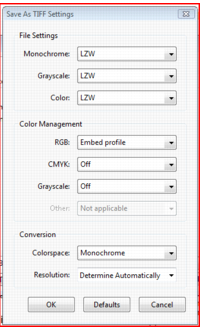
Colorspace – Monochrome (or grayscale.. Monochrome makes it 1 bpp and half the size of grayscale. Grayscale makes it 8 bpp.
Resolution – changing from 300 to 150 reduces size even more (and moves faster).
You can play with other options, but this change only makes it much better.
Was This Article Helpful?
Still Need a Hand with Your Database Setup?